
Chores & Allowance Bot
Wingboat.com LLCParenting
4.5708.00 Reviews
- Version
- 4.9.91
- Installs
- 100.00K
- Age Rating
- Everyone
Screenshots
Our Review of Chores & Allowance Bot
 Analysis by Appyee
I find a chore-and-allowance app most useful when it helps a family agree on expectations before anyone is already frustrated. Chores & Allowance Bot is built around that practical pairing: children can see tasks alongside the money they can earn, while parents have a shared place to keep track. It is a parenting app from Wingboat.com LLC, and its focus is narrower than a general family calendar or a broad household organizer. That can be a real advantage if your main goal is making routines and pocket money easier to discuss.
It is free to install, with in-app purchases listed at $39.99 per item, so I would check the purchase options before building a long-term routine around it. The app is rated for Everyone, and its current version is 4.9.91. It has an average rating of 4.5 from around 2.7 thousand ratings, with over 100 thousand installs. Those figures suggest it has found an audience, but they do not tell you whether its approach will suit your family; the best test is whether the chore-and-reward arrangement feels fair and simple at home.
What to expect from a chore-and-allowance tracker
The basic idea is straightforward: organize tasks by family member, clarify what needs doing, and connect completed work with an allowance or other reward. In my experience, that is most helpful when everyone knows what “done” means. A reminder to clean a room can lead to different expectations; a specific note can make the task less open to interpretation and reduce the need for a follow-up conversation.
Compared with a paper chart on the fridge, an app is easier to revise when schedules change and can keep a running view of what each child has earned. Compared with a shared calendar or general to-do list, this one is more directly aimed at chores and allowance rather than appointments, shopping, or every family commitment. That focus is useful if you want those records together, but it is not a substitute for a full household planner.
Getting Started with Chores & Allowance Bot
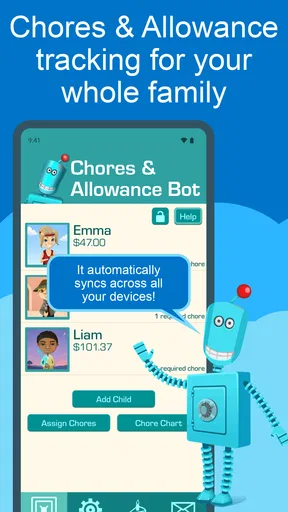
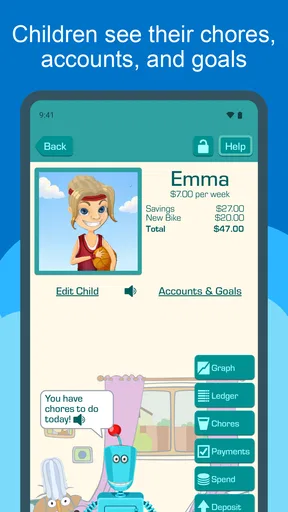
First things first, setting up the app is a walk in the park. You can download it from both the Android and iOS stores, and the installation is smooth sailing. Once you've got it on your device, the app greets you with a friendly interface that’s super intuitive. You can quickly add family members, set up individual profiles, and start assigning chores. The UI is colorful and engaging, making it appealing not just for adults but also for the little ones.
Set up a routine before adding a long list
For a first run, I would start with a small set of jobs the family already understands rather than trying to map every household responsibility at once. Choose a few repeatable tasks, decide who owns each one, and agree on what counts as completion. This gives children a quick route to their first success and gives parents a chance to see whether the app’s way of organizing chores fits their household.
It also helps to separate regular responsibilities from occasional jobs. If every task carries a payment, children may reasonably start treating even basic family contributions as a transaction. A family can avoid that confusion by agreeing in advance which chores earn allowance and which are simply part of living together. The app can help keep the arrangement visible, but the family still needs to decide what feels appropriate.
Assigning Chores
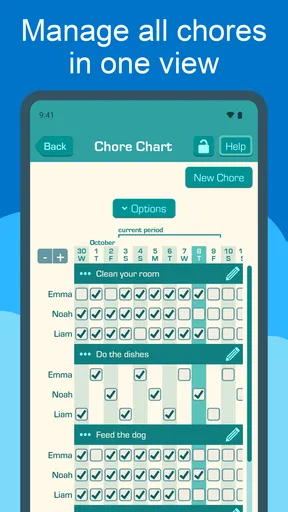
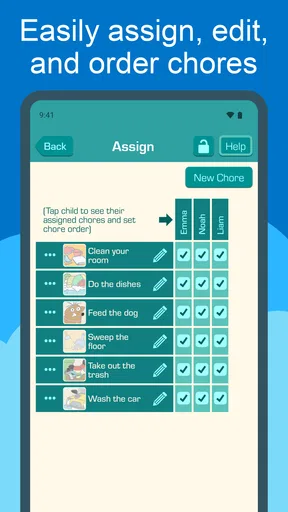
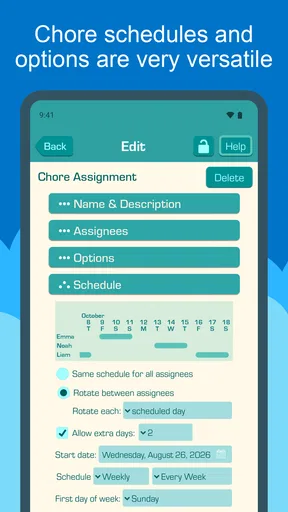
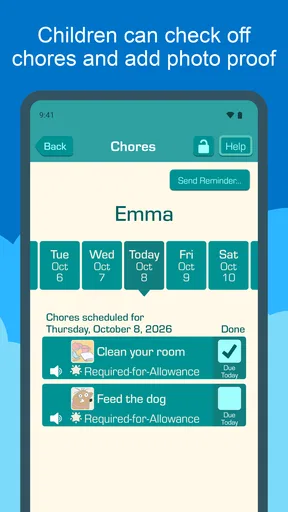
The beauty of the Chores & Allowance Bot lies in its simplicity. You can assign chores to each family member with just a few taps. Whether it’s taking out the trash, cleaning the room, or feeding the pets, you name it, and the app has got you covered. You can set chores as one-time tasks or recurring ones, depending on what suits your family’s schedule. Plus, you can add notes for specific instructions, which is a neat little feature that helps clarify expectations.
Those notes are worth using for the details that tend to cause disagreements: whether a pet’s bowl needs washing, whether laundry should be folded or just brought downstairs, or which parts of a room need attention. I would keep instructions short and concrete. A note should make a task easier to complete independently, not turn it into a long checklist that a child has to decipher.
Make the first completed task count
A useful first success is a small, visible chore that a child can finish without several reminders. For example, a parent might assign setting the table before dinner, add a brief note about what belongs at each place, and then check the result together. That creates a natural moment to acknowledge the effort and confirm how the family will record completion. It is a calmer introduction than launching the app during an argument about an unfinished bedroom.
For recurring tasks, choose a rhythm that matches real life rather than an ideal schedule. A chore that only makes sense on certain days can become a source of confusion if it appears when nobody expects it. It is also sensible to review the list when school, activities, or household routines change. A tracker works best when its assignments reflect the week the family actually has.
Tracking Allowances
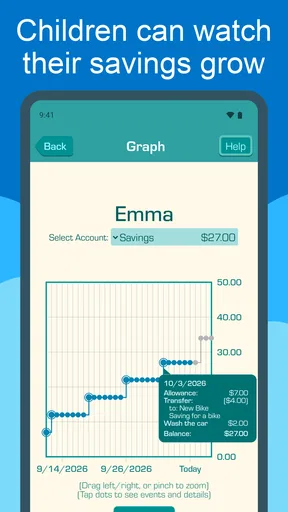
Let’s talk about the allowance part, which is, honestly, my kids’ favorite feature. You can link each chore to a certain reward or allowance. This way, kids know exactly what they’re working towards. The app allows you to set up virtual accounts for each child, showing how much they’ve earned and what’s pending. Trust me, watching their virtual piggy banks grow is a thrill for them!
"Mom, I can finally buy that toy I wanted!"
That was my daughter’s reaction after completing her chores for the week. The app not only teaches them responsibility but also financial literacy, which is a win-win in my book.
Keep the reward system understandable
Before assigning amounts, I would explain whether a displayed balance represents money already paid or money still to be settled. The distinction matters: a child may see an earned total as cash in hand, while a parent may think of it as a record to review at the end of the week. Agreeing on when allowance is actually handed over prevents the tracker from creating a second conversation about what the balance means.
A modest, consistent system is often easier to manage than changing rewards whenever a task feels harder. If you do want to recognize extra effort, make the reason clear so a bonus feels like a deliberate exception rather than a new rule that everyone has to guess. This is one place where the app can record the family’s decision, but it cannot decide what counts as fair for siblings of different ages or abilities.
Customizing and Notifications
One of the standout features is customization. You can tailor the app to fit your family’s unique needs. Set different levels of difficulty for chores, adjust the value of allowances, and even change the themes to keep things fresh. What’s more, the app sends notifications to remind kids about their tasks, which means less nagging from us parents.
Notifications are most useful as prompts, not as a replacement for a routine. If a child receives reminders at inconvenient moments, the alert may be ignored and the app can start to feel like another source of noise. I would first agree on when a reminder is helpful, then pay attention to whether it is actually prompting action. A calm check-in may work better for some children than relying on a device notification to manage every task.
Customization also brings a small trade-off: the more you adjust values and difficulty, the more important it becomes to keep the rules understandable. If a chore’s reward changes from week to week, children may focus on the inconsistency rather than the responsibility. A simple arrangement that everyone can explain is generally easier to maintain than a finely tuned system that needs frequent parent intervention.
Family Engagement
The app encourages family engagement by allowing parents to leave feedback on their kids’ performance. It’s a great way to motivate and appreciate their efforts. You can leave little notes of encouragement or even surprise them with bonus rewards for a job well done.
Feedback is most effective when it describes the effort or result rather than making a child feel that the app is judging them. A short, specific note can reinforce a useful habit, while a missed task may be better handled with a conversation about what got in the way. The tracker can keep the task visible, but a family still needs room for illness, busy days, and other ordinary exceptions.
Where the approach can feel awkward
This style of tracking is a good fit when children are ready to take some ownership and can understand a clear link between a task and its reward. It may be less suitable for very young children who need hands-on help, or for families who do not want allowance connected to chores. In those cases, a simple visual routine chart or a conversation at the start of the day may be more natural than managing profiles and balances.
It can also feel like extra administration if parents have to enter every small job, check each result, resolve disagreements, and then separately handle payment. I would not expect an app to remove that work entirely. Its value is in making the agreed arrangement easier to see and discuss; if the family’s main problem is a lack of time or cooperation, the tracker alone will not solve it.
Security and Privacy
In terms of security, the app is pretty solid. It requires a password for parental control settings, ensuring that kids don’t sneak in and give themselves extra allowances (not that mine would ever try that!). Plus, the app doesn’t request unnecessary permissions, so you can rest easy knowing your family’s data is safe.
Because this is a family tool, I would still take a moment to decide which device the adults will use to manage the setup and how children will access the information. A clear household rule about who can change tasks or rewards can prevent accidental edits as well as disagreements. The password protection is relevant to parental controls, but families should treat it as one part of sensible device habits rather than a reason to share access without thinking it through.
Who will get the most from it
I’d recommend trying it if your family already discusses allowance and wants a shared record of chores, earnings, and pending rewards. It is especially practical when children have different responsibilities, because each child can have an individual profile instead of relying on one chart where tasks and totals are easy to mix up. The everyday payoff is less about making chores fun every time and more about giving everyone a consistent reference point.
By contrast, if you only need to remember who is taking out the trash tonight, a note on the fridge or a basic to-do list may be quicker. If your family avoids financial rewards for household work, the allowance side may be unnecessary friction. And if you need one place for school events, appointments, meal plans, and chores, a general family calendar is likely a better central tool, with this app only worth considering if allowance tracking is a separate priority.
Overall Experience
All in all, the Chores & Allowance Bot is a fantastic tool for any family looking to streamline chore management and teach kids the value of work and money. It’s user-friendly, engaging, and really brings the family together in a fun and productive way. If you haven’t tried it yet, I’d highly recommend giving it a go. Trust me, your household will thank you!
So, what are you waiting for? Grab the app, get the family on board, and start turning chores into something everyone looks forward to.
My practical advice is to treat the first week as a trial of your family’s rules, not a test of whether the children are perfectly consistent. Start with a few tasks, use notes to remove ambiguity, and check together whether the reminders and rewards make sense. If the routine feels fair and the records save repeated explanations, keep building from there; if it creates more negotiations than it prevents, simplify the arrangement or use a less structured alternative.
Verdict
Strengths of Chores & Allowance Bot
- Easy setup and user-friendly interface.
- Customizable chore scheduling features.
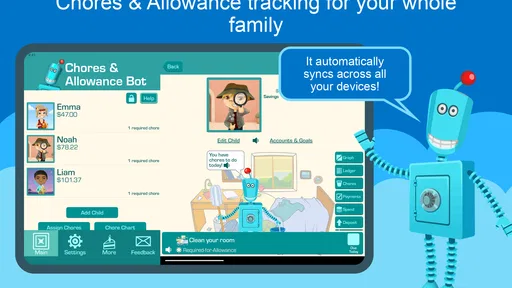
- Tracks multiple children seamlessly.
- Engaging reward system for kids.
- Parental controls ensure privacy.
Limitations of Chores & Allowance Bot
- Limited integrations with other apps.
- No support for recurring tasks.
- Requires internet to sync data.
- Free version has limited features.
- Ads can be slightly intrusive.
Similar Picks in This Category
View All
Family Space
Motorola Mobility LLC.3.9

شرطة الأطفال - مكالمة وهمية
Oub Apps4.1

Findmykids: Parental Control
LETEM LTD4.6

Pregnancy + | Tracker App
Philips Electronics UK Limited4.8

Policía de niños - para padres
Kids police4.7

Pregnancy App
Amila4.9
Frequently Asked Questions
What is the main purpose of the Chores & Allowance Bot app?
The Chores & Allowance Bot app is designed to help families manage chores and allowances effectively. It allows parents to assign tasks to their children and track their completion. Additionally, the app facilitates the management of allowances, helping children learn about financial responsibility. The app aims to simplify household management while encouraging kids to develop good habits.
How user-friendly is the Chores & Allowance Bot app for both parents and children?
The app is designed with a user-friendly interface that caters to both parents and children. It offers intuitive navigation and clear instructions, making it simple for users of all ages to understand and use. Parents can easily assign tasks and manage allowances, while children can view and complete their chores with minimal guidance.
Can the Chores & Allowance Bot app be customized for different family needs?
Yes, the app is highly customizable to suit different family dynamics and needs. Parents can set up individual profiles for each child, customize chore lists, assign tasks based on age and capability, and set different allowance rates. This flexibility ensures that the app can adapt to varying family structures and parenting styles.
Is the Chores & Allowance Bot app secure and does it protect user privacy?
The Chores & Allowance Bot app prioritizes user privacy and data security. It employs robust encryption methods to protect personal information and financial details. Additionally, the app adheres to relevant privacy laws and guidelines, ensuring that your family’s information is kept confidential and secure from unauthorized access.
What devices are compatible with the Chores & Allowance Bot app?
The Chores & Allowance Bot app is compatible with both Android and iOS devices, ensuring broad accessibility for users. It supports a wide range of smartphones and tablets, and regular updates ensure compatibility with the latest operating systems. This ensures that families can use the app seamlessly across different devices.
